Inventory Text Update
Add Product Tag
To show inventory text on a product, add the following product tag:
show_inventory
How to edit inventory messaging on Collection Pages
Navigate to the theme customer
Select Collections in the dropdown > default collection
Select the COLLECTION PAGE Section

Scroll down to the Product Inventory Messages Settings
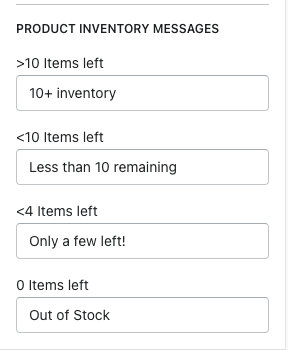
You have 4 options to add messaging for. When the product reaches these limits, it will display the text that has been entered. If there is no message specified, it won't display anything.
Greater than 10 items left
Less than 10 items left
Less than 4 items left
0 items left
How to add inventory text on the product pages
Navigate to the theme customizer
In the dropdown, select Products > default product
Select the PRODUCT PAGE Section

Scroll down to the Product Inventory Messages Settings
-efbed23a8ec97925a7fb965c0257d37e.png)
You also have 4 options to add messaging for. When the product reaches these limits, it will display the text that has been entered. If there is no message specified, it won't display anything.
Greater than 10 items left
Less than 10 items left
Less than 4 items left
0 items left