Theme Settings
Theme Settings
GEO BLOCK
Log in to your Admin page: https://shop-micro-kickboard.myshopify.com/admin
Click “ONLINE STORE”
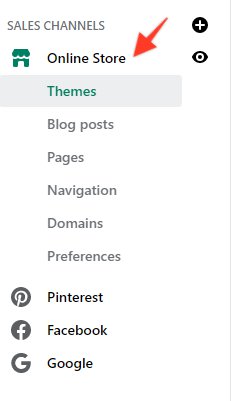
Select the “GEO BLOCK” Theme and click “CUSTOMIZE”
Scroll down to “GEO BLOCK”
Click “THEME SETTINGS” then select “GEO BLOCK”
-9795f2165d1c58cc7290a7141cfa0dd6.bin)
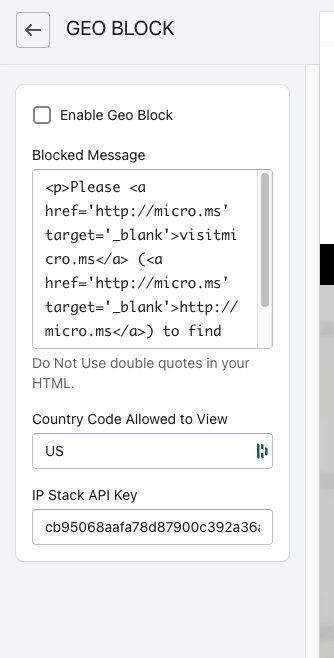
Enable Geo Block = Enable blocking of users outside of the selected country
Blocked Message = Message to display on the product page where the ADD to Cart button would be if the user was in the correct country
Note: HTML cannot contain any double quote
Country Code = Two-Digit Identifier for the ALLOWED country. Default = US
ADA screenreader text and phone number by chat icon
THEME SETTINGS / ADA Helpers
Add the text / enable/disable using the checkbox
Original Text
Live Chat may not work correctly in a screen reader, if you need assistance feel free to call us at <a href="tel:18882365657">(888) 236-5657</a>
Checkout page Alert message
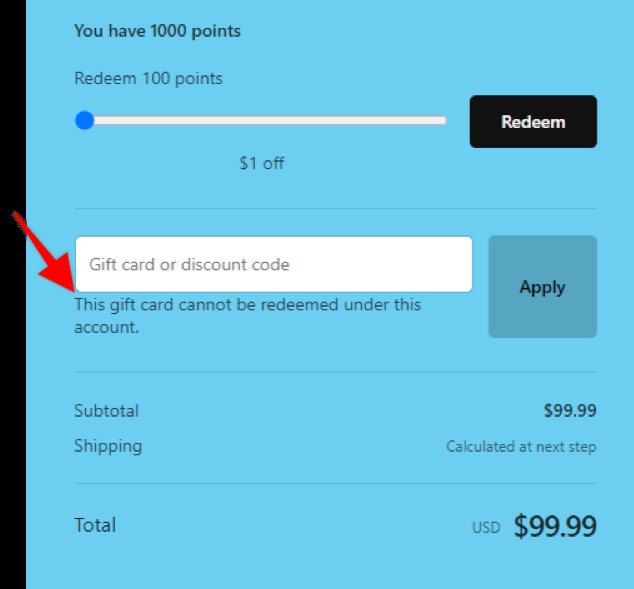
Settings→Store Languages→Change theme language→Gift cards→Alert message not logged in & Alert message logged in
-7ab99a3c679e240e3b0627c725915417.bin)