HLS Video Section Configuration
Navigate to the theme customizer - new video section is called HLS Video
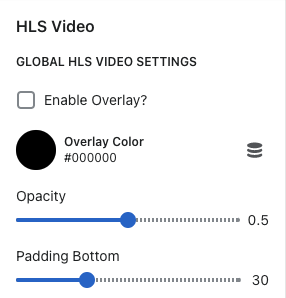
When clicking HLS Video Section these are the following settings:
Enable Overlay - enables / disables overlay color to appear on the video section
Overlay color - Can choose what color you want for an overlay
Opacity - how light / dark you want the overlay to be
Padding bottom - this slider controls how much padding you would like to have below the video section
To add a video, select the 'Add Video' block

Video Settings
Content Settings:
Content Alignment - can choose the placement of where you want to the text / buttons to show on the video section
Text Settings:
Title - heading that displays on the video section
Subtitle - text that displays on the video section
Button Settings:
Button Text - text that displays in the buttons
Button URL - link you want associated with that button
Video Settings:
Video URL - this is where you will add the video link (this video section accepts live streaming, which loads the video a lot faster than a normal video link)
Desktop placeholder image - image that shows before the video loads
Mobile placeholder image - image that shows before the video loads
Show controls on video - the enables / disables the video controls on the video. Play, pause, volume, etc