How to Add New Galleries
- Log into WBA. (Instructions to Update Website Portfolio)
- Open a new tab and select "WBA"

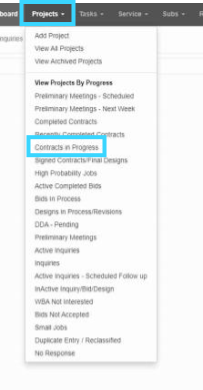
- Click "PROJECTS" then "CONTRACTS IN PROGRESS"
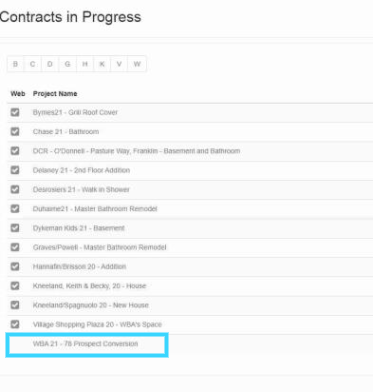
- Select a new "PROJECT NAME". It will NOT have a green checkmark.
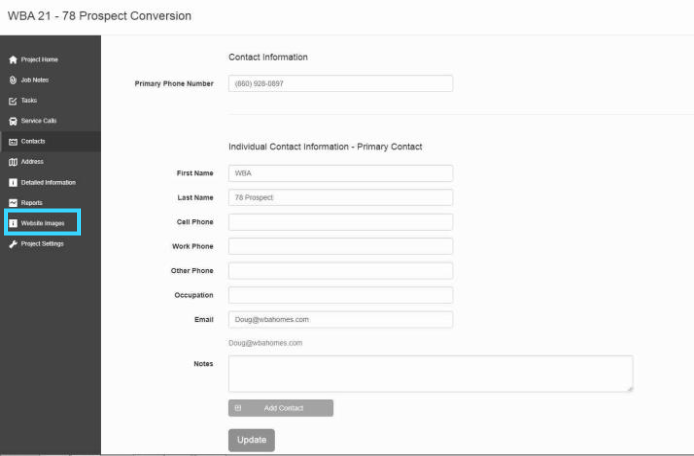
- Click on "WEBSITE IMAGES" found on the left-hand side.
- Under "GALLERY NAME", change the name to city/town the project is being done, and the type of project. Example: Dayville Garage.
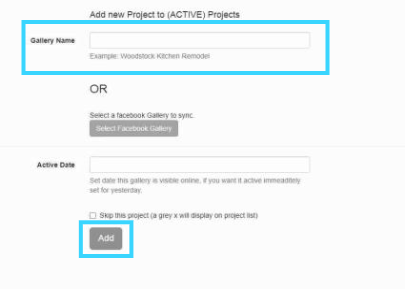
- Click "ADD"
- Return to "WBA Edit Content" -> "PORTFOLIO" -> "ACTIVE PROJECTS (click where it says 'no image) and you will see the new gallery.