Account Creation Form
- Open Theme Editor
- On the top box, search for - select Customer Register from the results

3. Expand Customer Registration on the left edit column
4. Click on the existing blocks to edit your list of items.
5. Click Add Dropdown to add a new dropdown
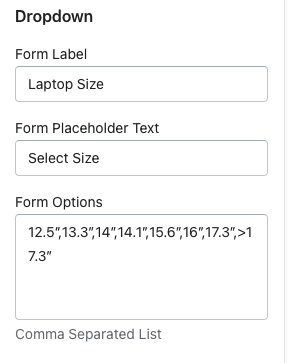
Form Label: The Label Above the Dropdown on the Account Registration Page
Form Placeholder Text: The first option in the dropdown before a selection is made
Form Options: Comma separated list of items in your dropdown.