Badge Configuration
In the theme customizer, go to theme settings (the paintbrush icon). Select SALES BADGE Section

When you select that section, you will see these settings for the sales badge configuration
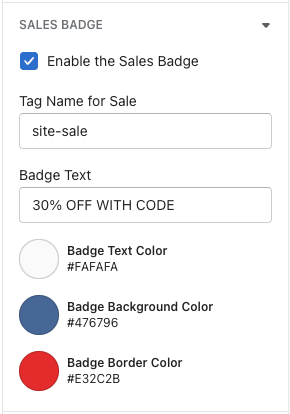
Checkbox - enables / disables the badge to show. To show, it has to be enabled
Tag name - enter the tag you would like to add onto products in the backend (products that are going to use this badge)
Badge text - enter the text here that you want displayed in the badge
Badge text color, background color, & border color settings - lets you choose the colors / customize the badge look
Then, just need to tag the products in the admin with tag you applied in the tag name text field.