How to enable the Order notes on the Cart page
How to enable the Order notes on the Cart page
How to enable the Order notes on the Cart page.pdf
- Open the theme customizer
- Access the Cart page from the dropdown menu at the top of the page
-12f0050b50b6037f19a44e04041f95b5.bin)
- Click Cart page from the Admin panel on the left side
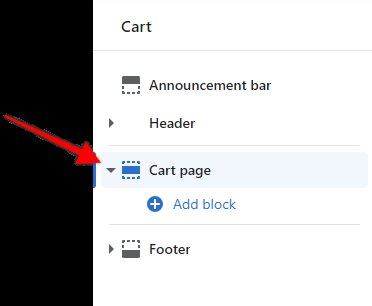
- On the right side of the customizer, click on the checkbox Enable order notes text box
-c830775829be1c7b06cde21ff4559036.bin)
- Click the Save button to save your theme changes
How to change the text of the Order note
- The text in the order note can be changed via the Theme language page
- Click Settings, which is located at the bottom of the admin panel
-2438f33dfbd957c328858962a6377088.bin)
-
- Click Store languages
-91303f130ac95a659b4d52c40ad5fe26.bin)
-
- Click Change theme language
-b3f5bc140c9f68d9eccc389d7fe6014b.bin)
-
- Click Cart
-
- The text box below Enter order note is where the text can be changed
-78950525b7cbf241aee2bcb15a30d5a2.bin)
-
- Click Save to complete the changes