Embroidery Update
We created an embroidery section that will appear on all pages in the theme customizer

The embroidery is an actual product that we created in Shopify. The variants are how the pricing is is listed for each embroidery type.
This is the admin link to the product: https://bellabliss1.myshopify.com/admin/products/7256175313090
Metafields
We added the following metafields in the admin to display for EVERY product.
Enable Full Name Embroidery
Enable Initial Embroidery
Enable Monogram Embroidery
Enable Oversize Full Name
Enable Oversize Initials
NOTE:
Embroidery Fee
Embroidery Drop Down Title Label
Enable Specialty Monogram
Are ONLY used when running a special monogram option - Like the Cece Dupraz collaboration previously ran.\
-32a2f7af107fef116af74fb4cf601977.png)
These values are True or False. You select true or false depending on what the product offers for embroidery. For example - some products may only offer Full name embroidery & Initial embroidery - so you would select TRUE for those two metafields. And select false for Monogram.
Theme Customizer Settings
In the embroidery section, this is where you will add the font images & select the colors.
When you select the Embroidery section, the only setting is the Embroidery product. This just selects the embroidery product that was mentioned above.
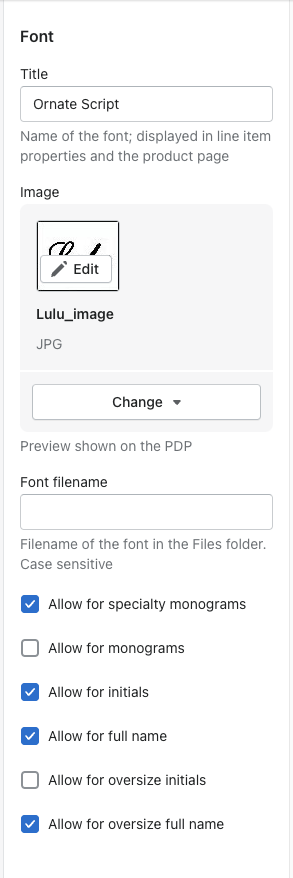
To add a font:
Select ADD BLOCK. You will see a font block.
Title = the name of the font
Image = the image displayed on the PDP of the font (preview)
Font filename = this can be blank for now in this first update. We added this setting in for when we are ready to add in the actual font preview on the PDP.
Allow checkboxes = this is where you will check which font belongs to an embroidery type
To add a color:
Select ADD BLOCK. You will see a color block.
Title = name of the color
Color selector = where you choose the color or add the hex code
Allow checkboxes = this is where you choose which color belongs to an embroidery type
-9bb9dacca5ae67629e1bb226e7120f5d.png)