Computer Configuration
NODE: 14 LTS (do not use 16)
Github Repos:
Primary REPO : https://github.com/Text-Connects/udf-cordova-test
Electron (WIN/MAC Desktops) : https://github.com/Text-Connects/udf-electron
Setup Dev Environment (App Build)
- Clone Primary Repo
- Verify Node 14 LTS
- Run Global NPM Commands
npm install -g cordova

npm install -g electron

npm install -g node-gyp

npm install
4. Build out the different version
<pre class="language-bash">
   <code class="lang-bash">
      <strong>cordova platform add ios</strong>
      </strong><strong>cordova platform add android
      </strong><strong>cordova platform add browser
   </code>
</pre>
info
NOTE: PC required for Electron / PC Build, but cannot run iOS platform build
If you have issues, run the following command PC ONLY
cordova platform rm ios
5. Run in a browser
cordova run browser
info
Could not load API error - remove the build and add again to fix
cordova platform rm browser
cordova platform add browser
cordova run browser
Build for Browser
- Run up to step 4 above and make sure the platform "browser" is added
- Run the cordova build for "browser"
gulp compile-sass && cordova build browser
- Open another VS Code window with the UDF-Electron Github Repo
https://github.com/Text-Connects/udf-electron - Copy the files in WWW from the UDF github into the APP folder on the UDF-Electron Github Repo
- Increase the build version in the UDF-Electron/package.json file
- Make sure you have the right version of node (14) and also NPM Install
nvm use 14

npm install
- Validate your build is working by running
npm run start
- Once done testing, run the following command to push to the electron server
npm run release
Setup / Notes for Electron Release
Requirements

Python2
Update dmg builder node package
Github Token
- Setup Python2 on your M1 Mac - in terminal
##Install PYENV

brew install pyenv

## Initialize PYENV in your terminal window

pyenv init

## Install Pythonv2

pyenv install 2.7.18

## Set to use 2.7.18

pyenv local 2.7.18

## Determine the location of Python for use in the next step

pyenv which python

COPY THE Whole directory link for use in the next step
- Update DMG Builder
- Navigate to the node_modules / dmg-builder / out / dmg.js
- Line 261 - replace the /usr/bin/python with the path you copied from the step above
- Hit Save
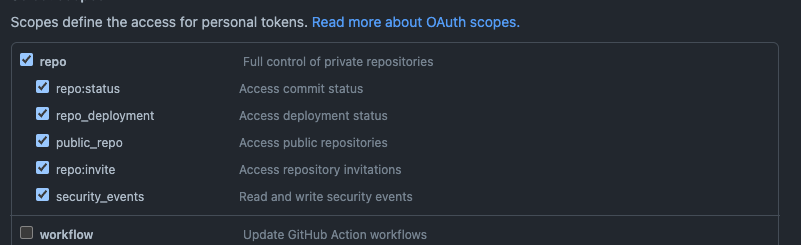
- Generate a Github Token
- Open Github and Tokens for your account - https://github.com/settings/tokens
- create a new token with the scopes shown in the screenshot below
- Copy the token and paste in the package.json file on the RELEASE line where gh_token= is