How to add shipping notice at checkout
To begin, navigate to the Shopify Admin page: https://nolan-ryan-steaks.myshopify.com/admin
Select Online Store, then Themes:
**helpful hint: When selecting Online Store, do not click on the “Eye” image. The Eye will take you to the actual webpage and out of Shopify.
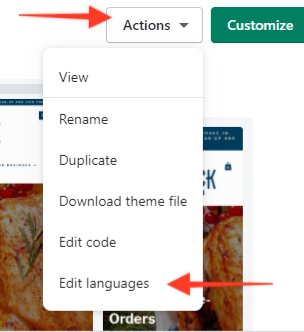
Next, at the top right-hand side of your screen, select Actions, which will open a drop-down menu. Select Edit languages.
In the Language (English) page you can inter the information your customer will see in each section of your website; from error pages to homepage verbiage. .
Select Checkout & system
In this example, the text added will appear in the store as follows: