Price List / Catalog Update
In order for customers to see the 'hidden' price lists, the customer has to be tagged with:
price-list

In the CUSTOMER CARE menu (the footer navigation)
https://nice-knobs.myshopify.com/admin/menus/58760429635
The following needs to be added in front of the menu name:
[price]
Example: [price]Cat Page Order Pricelist
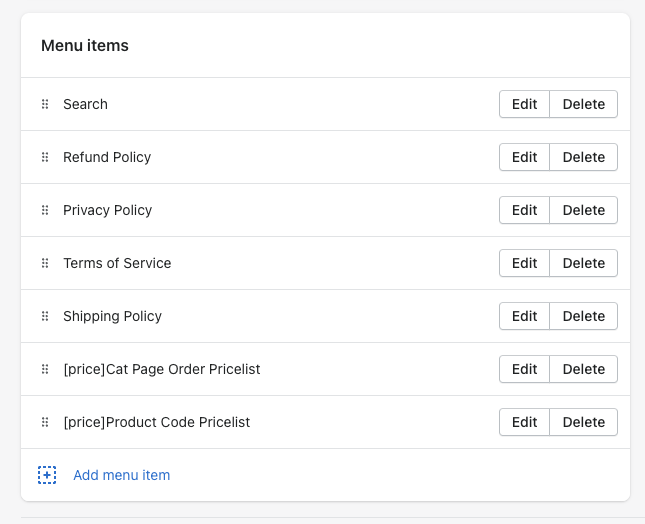
This allows the link to be hidden from customers not tagged with price-list
Catalog Update
You can Click on CUSTOMIZE THEME for the live theme. If you look at the footer, you will see the links with the wording
[EDITOR ONLY VIEW] ________________ Pricelist
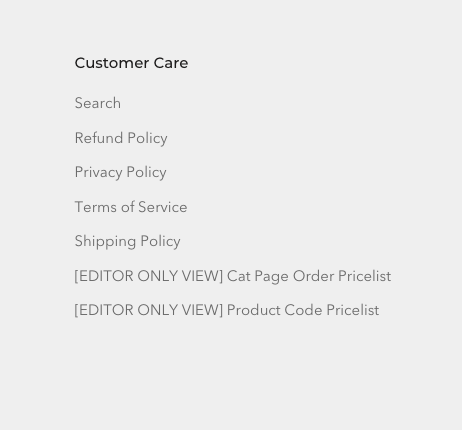
We made it so you can see the links without logging in, if you are using the theme customizer.
Category Viewer PDF - https://nice-knobs.myshopify.com/admin/themes/120422694967/editor?previewPath=%2Fpages%2Ffrench-foundry-price-list
Price Viewer PDF - https://nice-knobs.myshopify.com/admin/themes/120422694967/editor?previewPath=%2Fpages%2Ffrench-foundry-pricing(the labels are not exact, just how I see them)\
You can then click on the PRIVATE PDF LIST option on the left. You can edit the url of the PDF in the setting that pops up. \
Note - PDFs cannot be shown inside the editor because they are consdiered restricted in Chrome/Edge/Firefox.