How to configure text on slideshow section
In the theme customizer, in the image slides, these are the following settings where you can configure the text on the image:
Image Slide Settings
You have the ability to specify a desktop image and a mobile image
-6c6dfdec87e452f0428f1787eb11f678.png)
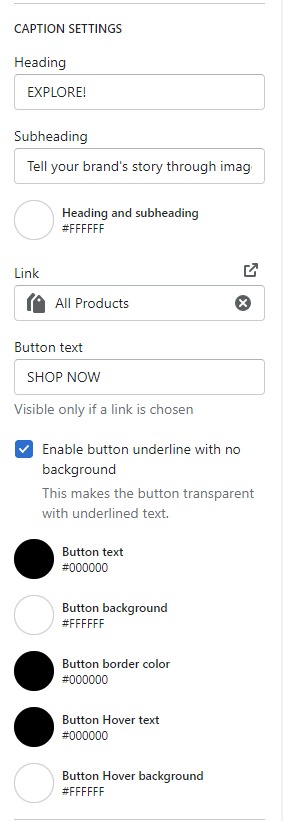
Caption Settings
Heading text box = add the text to display for the heading
Subheading text box = add the text to display for the subheading
Heading & subheading color selector = can choose the color for both the heading & subheading
Link = URL you want the button to link to
Button text = text that will display on the button
Enable button underline checkbox = you have the option to choose a button where it is transparent with underlined text. Checked = enabled, unchecked = disabled
Button text color selector = can choose the color of the button text
Button background color selector = can choose the color of the button background
Button hover text color selector = can choose the color when hovering over the text on the button
Button hover background color selector = can choose the color of the button background on hover
Mobile Colors
Can specify the button colors on mobile vs. desktop
Button text color selector = can choose the color of the button text
Button background color selector = can choose the color of the button background
Button hover text color selector = can choose the color when hovering over the text on the button
Button hover background color selector = can choose the color of the button background on hover
-68c4d8d4dc4c4938498e4d0a70837795.png)
Caption Positioning
Caption positions you can choose from in the dropdown:
Top Left
Top Center
Top Right
Center Left
Center Center
Center Right
Bottom Right
Bottom Center
Bottom Right
Note - the text on mobile will drop BELOW the image.
Text alignment options in the dropdown:
Left
Center
Right
Caption background color selector:
Can choose the color of the background "box" that appears behind the text - see screenshot for example
-74e2b93d4eabb97539a6aa16fd55c44c.png)
Caption background opacity:
Can choose the opacity of the background color. Can range from 0% to 100%
0% = no opacity
100% = opacity is the darkest
-37195640d232f71c41eeeaa846a4e7dc.png)