Free Gift with Purchase Configuration
In the theme customizer, click on theme settings (paintbrush icon)
You will see a new section called FGWP Settings'

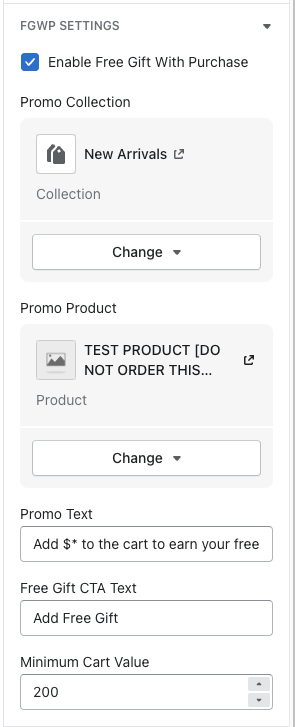
Enable Free Gift with Purchase Checkbox = this allows you to enable/disable the free gift functionality
Promo Collection = Can choose which collection you want the users to buy from in order to get the free gift
Promo Product = Can choose the free gift
Promo text = The text you want to display that shows above the free product in the flyout cart
Free gift CTA Button = The button text to add the free gift product
Minimum Cart Value = The threshold amount in order to get a free gift
NOTE - In the promo text field, the $* is the amount that pulls from the minimum cart value price