Order Sync
Scheduled - Once every 6 hours
Starting Time: 7:10am
Flow Steps:
- Export from Shopify
- Flow check to determine if the customer record has a NS tag ID, if it does, skip the import Netsuite Customer step
- If no ID, search by EMAIL address to find customer record using NS built in search
- Import into NS Sales Order
- Change Tag of Order to imported-ns
Detailed Walkthrough of flow:
Sources
Shopify Export
- Uses Main Shopify Connection
- API: Orders: Order
- Operation: Retrieve a list of Orders
- Search Parameters:
created_at_min: {{lastExportDateTime}}
since_id: 2975456002202
(Backup to prevent super old orders from re-importing if delta breaks)
- Export Type: Delta
FILTER on Export:
This filter runs after the export is handled to determine if an order has already been processed into NS. It is another backup for if the Celigo flow miss-triggers.
function filter (options) {

    if(options.record.tags) {
      var tagArray = options.record.tags.split(',');
      for(var i = 0; i < tagArray.length; i++) {
        if (tagArray[i].indexOf('imported-ns')>-1) {
          throw "Already in NS";
         return false;
         break;
        }
      }
    }

  return true
}
Destinations
Step 1 : Import Netsuite Customers
Filter on Import:
Runs this filter PRIOR to running a customer import - if the customer is tagged with NSID-, then we do not need to import into Netsuite as a new customer - instead we need to just reference this customer ID in the order import step.
function filter (options) {

    if(options.record.customer.tags) {
      var tagArray = options.record.customer.tags.split(',');
      for(var i = 0; i < tagArray.length; i++) {
        if (tagArray[i].indexOf('NSID')>-1) {
         return false
         break;
        }
      }
    }

  return true
}
If the customer is not filtered out, we are going to insert into NS using the following fields:
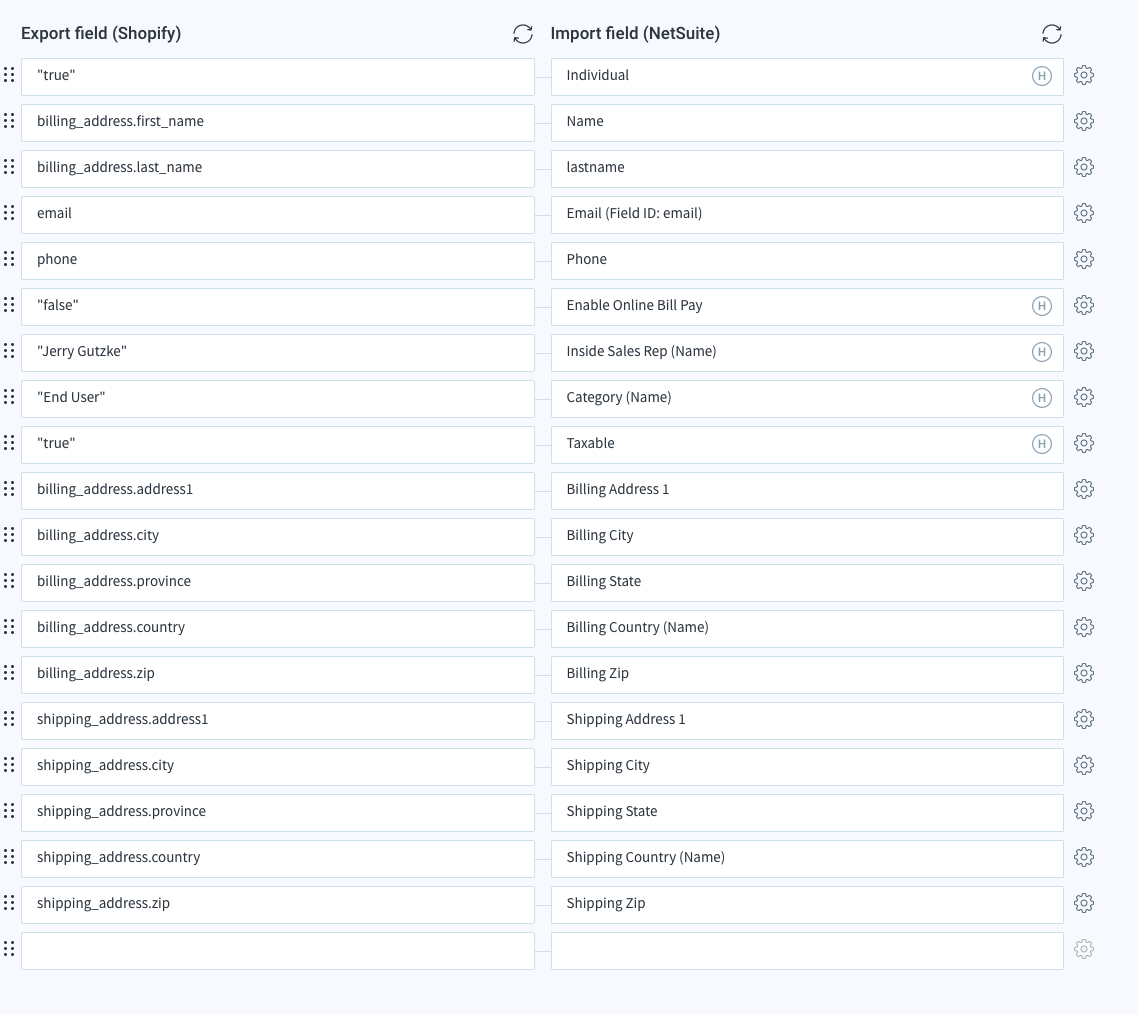
Defaults:
Sales Rep: Jerry
Category (Name): End User
Taxable: True
Response Mapping on Success:
After we successfully save the customer, it will then go through a response map
info
Response mapping just injects data back into the original data stream

Step 2 : Import Netsuite Sales Order
Field Mapping:
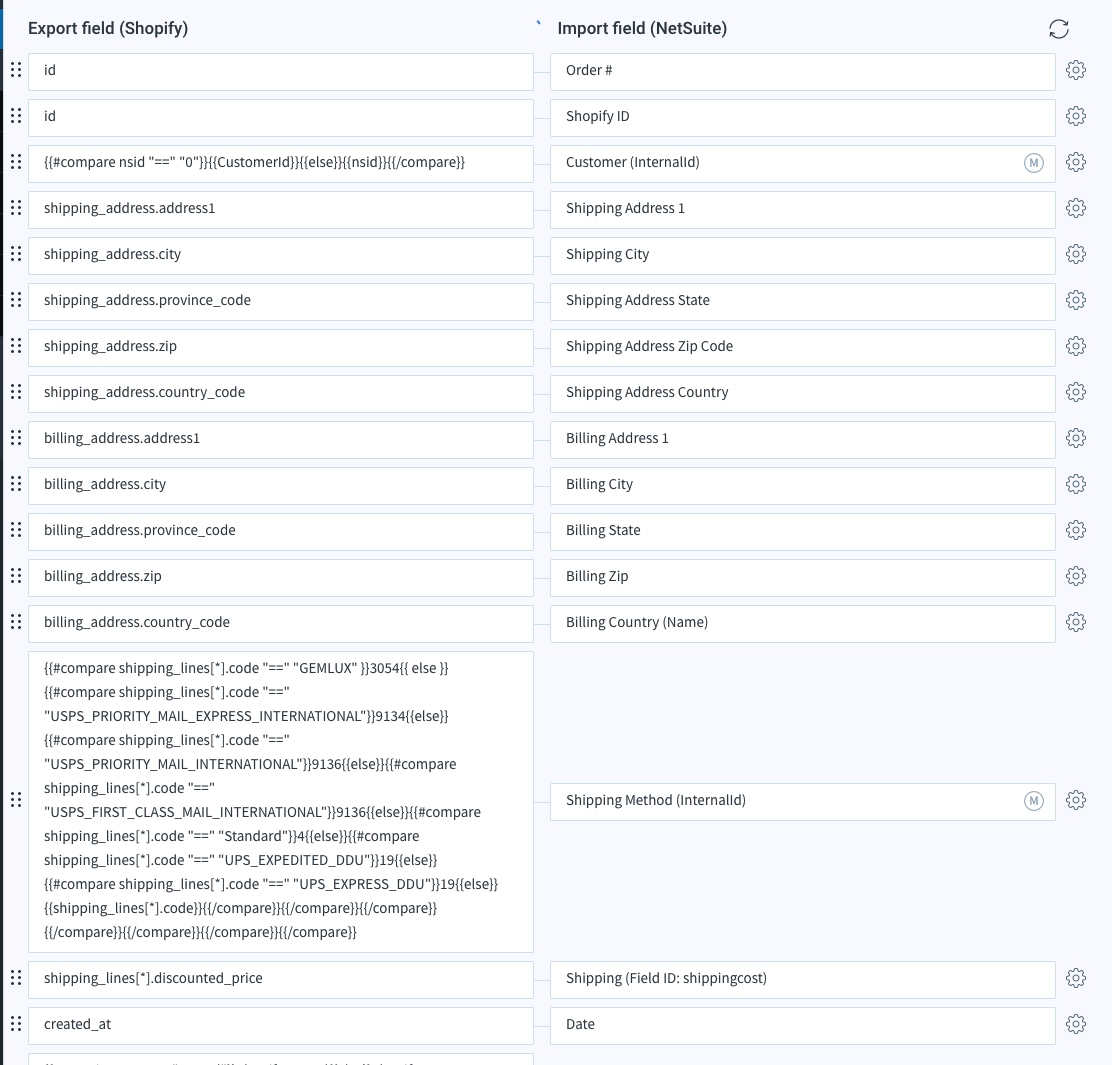
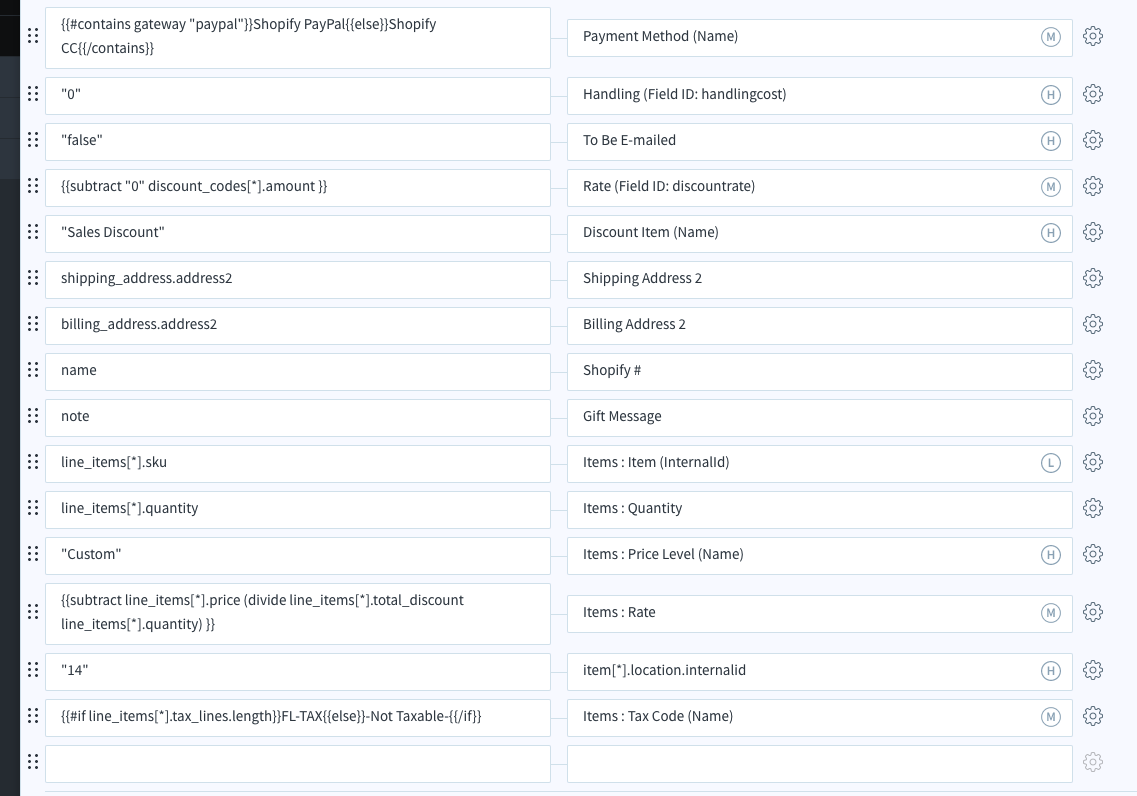
Special Mappings:
Customer (InternalID): We determine if the customerid is from the previous step or the tagged NSID
{{#compare nsid "==" "0"}}{{CustomerId}}{{else}}{{nsid}}{{/compare}}
Shipping Method: (spacing added for readability below - remove all newlines)
{{#compare shipping_lines[*].code "==" "GEMLUX" }}3054{{ else }}
{{#compare shipping_lines[*].code "==" "USPS_PRIORITY_MAIL_EXPRESS_INTERNATIONAL"}}9134{{else}}
{{#compare shipping_lines[*].code "==" "USPS_PRIORITY_MAIL_INTERNATIONAL"}}9136{{else}}
{{#compare shipping_lines[*].code "==" "USPS_FIRST_CLASS_MAIL_INTERNATIONAL"}}9136{{else}}
{{#compare shipping_lines[*].code "==" "Standard"}}4{{else}}
{{#compare shipping_lines[*].code "==" "UPS_EXPEDITED_DDU"}}19{{else}}
{{#compare shipping_lines[*].code "==" "UPS_EXPRESS_DDU"}}19{{else}}
{{shipping_lines[*].code}}
{{/compare}}{{/compare}}{{/compare}}{{/compare}}{{/compare}}{{/compare}}{{/compare}}
Payment Method: Just to define PayPal vs. Credit Card
{{#contains gateway "paypal"}}Shopify PayPal{{else}}Shopify CC{{/contains}}
Items: Tax Code (note, the colon in the NS Field indicates it is a line property)
{{#if line_items[*].tax_lines.length}}FL-TAX{{else}}-Not Taxable-{{/if}}