Installing Free Gifts BOGO buy x get y
Free Gifts by Secomapp is a powerful app allowing us to add Free Gifts with Purchase to any Shopify Store (doesn’t have to be on PLUS). It can be a little finicky - so if you notice any oddities, follow the Updating App JS details below.
NOTE: Developers of this app are NOT available during Chinese New Year. Do NOT Launch this app during this time period as there is very little help or assistance. Keep existing apps installed as that can also be a problem.
Installation
- Install App from Shopify App Store (https://apps.shopify.com/freegifts)
- WARNING - CODE UPDATE REQUIRED!
- Code Installation Instructions - DO IN PREVIEW THEME and new release
Building a new Gift With Purchase Promo
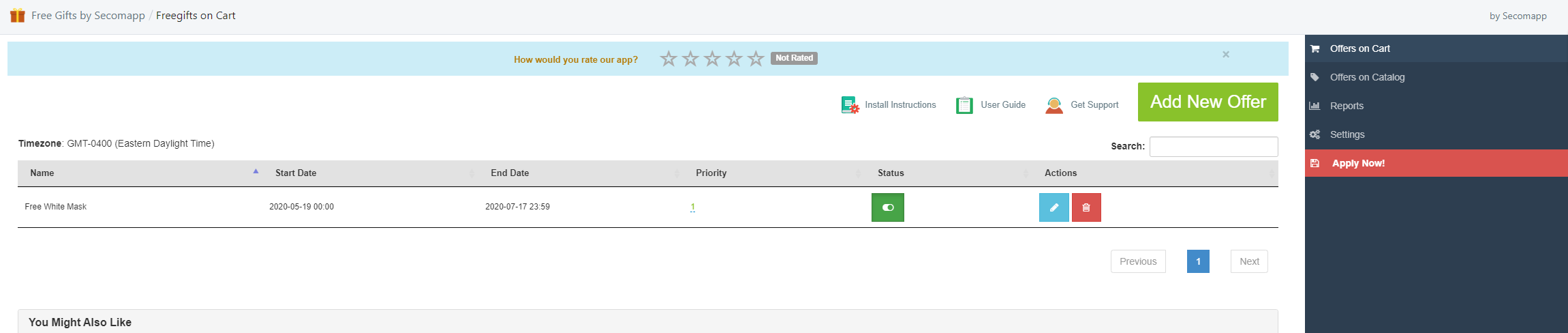
- Open Free Gifts by Secomapp from the APPS area of admin panel
- Click on ADD NEW OFFER button

- Enter the required information needed to run promo
- Name: Internal Tracking Name
- Start Date/Time
- End Date/Time
- Maximum Number of Gifts: Enter 1 or 0 if you want the customer to get a gift for EVERY time they are eligible (seldom done)
- Priority: 1-99 number that defines which free gift a user will receive on ALL promos being run. Smaller number wins
- Stop Processing: check this box if you want the system to only apply this promo and not apply any other eligible promos
- Condition - Total: ALWAYS set a minimum value, even if $1. This prevents the system from giving a free gift on a free gift
- Narrow By Products: ALWAYS use this option and select a collection for the promo to apply OR a product Type/Vendor.
- Select Product as gift - only use 1 product per promo, otherwise system does odd things.
- Click CREATE
- Click APPLY NOW on the right side
Updating App JS (If promo is not running correctly)
- Open Shopify Admin / APPS / Free Gift with Purchase App
- Toggle the promo you need to re-initialize on and off (Status) with the toggle switch
Hit the APPLY NOW button on the right side
Monthly Charges
-dd7d62df4df154571b2419a6de8ac95c.png)