Fourth Trimester Camera Management - Wordpress Configuration
Settings
Your API Key
This setting is a required setting. It represents the Google Client ID found in the Google Cloud admin. This allows the app to communicate with Google to get the camera feeds.
Your App URL
This setting is a required setting. It represents the hosted url needed to run the api calls. Without this, we cannot request the camera feeds.
Video Poster
This setting is an optional setting. It represents the placeholder image that loads when the video player is loading.
Connect Google Account
This button can have 2 states. It can either say...
Connect
When the button is in this state, you need to run the Google sign in process to authorize the cameras with the plugin.
INFO Before you get started, add all the cameras you have to the Google Home App.
- Click the Connect Button
- Select 4th Trimester gmail account when the page opens
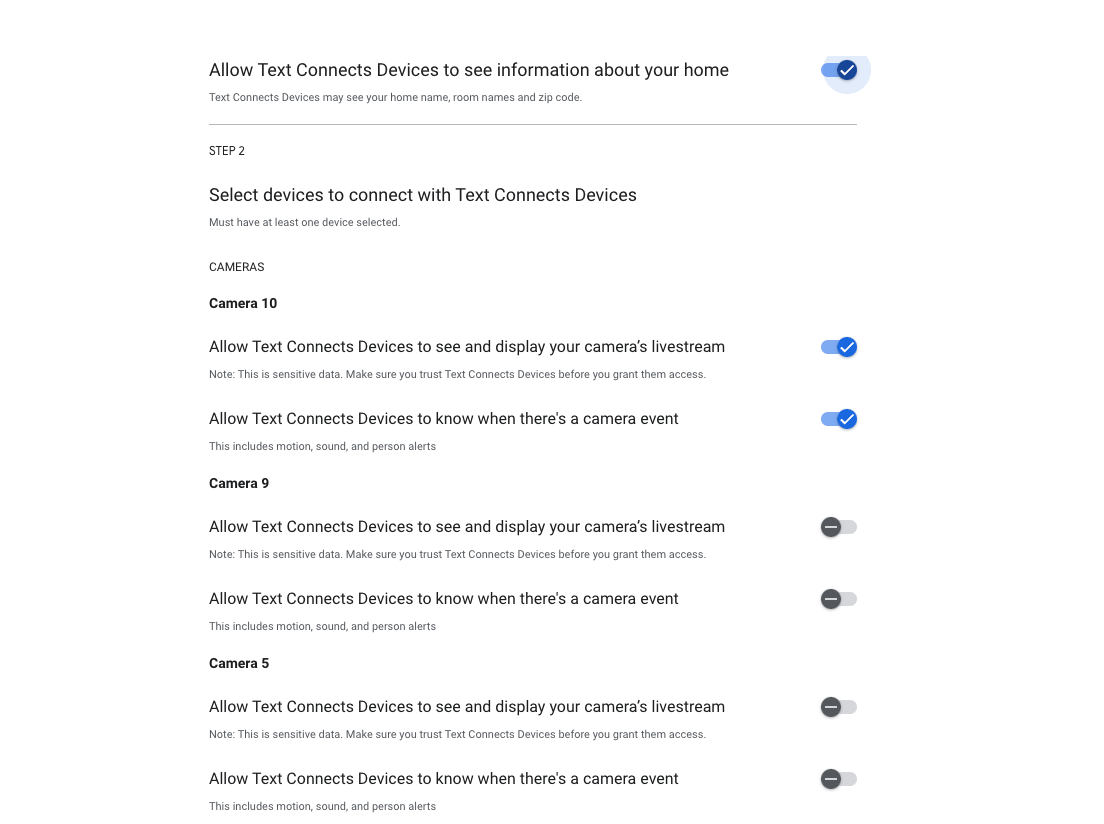
- This should open a new tab with a page that has all of the cameras listed. Next to each listed device, you should see a toggle button.
- Select "Allow Access" checkboxes for all of the cameras you want to approve for use in the plugin. ( See Screenshot )
- Continue to the next step
- Select the 4th Trimester gmail account again
- Select "Continue"
- If a warning shows up about the app not being validated by google, select the option to approve the app anyways.
- After this is finished you should see a page that states you can safely close the window.
- Return to the Settings page in the Wordpress Admin
- If the page did not automatically refresh, refresh the page
If everything worked correctly, the Connect button should now say "Disconnect" and when visiting the home page, you should see an updated view of available cameras.
Disconnect
Disconnect will unlink all Google Nest Cameras from the camera plugin and allow you to run the connect process again.
INFO You should only use this when you are:
- Adding a new camera to the Google Home App
- Updating camera details for existing cameras in the Google Home App
- Configuring the app after an update